I see people in the support forums all the time asking about backing up their gmail mail with Thunderbird and I really do not understand why they are doing so.
Google offer a direct backup of your Gmail mail, as well as all of your Google data, but it is mail that appears to be the thing people want to back up. Google create a backup MBOX mail format file with your mail which they then compress so it is smaller and offer it to you to download. The MBOX format is used by Evolution, Thunderbird, Mac Mail and lots of other mail clients and is a de facto standard for mail storage and exchange.
This archive file can be unzipped and imported into a mail client at any time, now or in the future.
In the case of Thunderbird, the Import/Export tools will import the MBOX file into Thunderbird for you, without fuss.
Sure there are other ways to backup your gmail, but this is probably the least difficult and most sure of any and uses significantly less bandwidth than any other method to boot.
Wednesday, April 9, 2014


Friday, February 7, 2014
Basic troubleshooting for Thunderbird.
Like all communications, email to is prone to drop outs and minor and sometimes major faults. So when you mail is not working, what do you do.
The following is a list of checks you need to make.
Finally if you have the urge to say suddenly my mail stopped downloading / working. It is more than likely not an issue with your mail client. Sometimes it is the mail provider changing connection settings so these need to be confirmed. Other times it is following an update to Thunderbird, then it is more than likely the firewall component in your internet security suite / anti virus.
The following is a list of checks you need to make.
- If your mail is not downloading, check on your mail providers web site that they are not having some sort of outage, or server down issue. After all, whilst things have become quite reliable in recent years, there are no guarantees.
- Next restart Thunderbird with add-ons disabled. (Thunderbird safe mode) Thus us on the help menu (Ctrl + H). If Thunderbird works like normal, there is an Add-on or theme interfering with normal operations, you will need to re enable add-ons one at a time until you locate the offender.
- Restart Windows in Safe mode with Networking. Windows 8 Windows 7 Windows Vista Windows XP OSX If this fixes your ussue, it will be resident software loaded into your computer other than Thunderbird that is the cause. Common problem applications that are not loaded in "safe mode" are anti virus tools, malware detection programs, memory and disk optimisers, privacy protectors and legitimate spy-ware installed by employers to monitor staff. No naming of names here, usually in a home environment it will be anti virus programs, but all security and net nanny type software is suspect.
Finally if you have the urge to say suddenly my mail stopped downloading / working. It is more than likely not an issue with your mail client. Sometimes it is the mail provider changing connection settings so these need to be confirmed. Other times it is following an update to Thunderbird, then it is more than likely the firewall component in your internet security suite / anti virus.
Tuesday, December 31, 2013
Windows Contacts
For a long time it has irked me that Thunderbird supported read access to the OSX address book, a really minor player, but did nothing for Windows contacts. Especially given that windows represents some 70% of the installed user base it just appeared like the developers had lost the plot. Imagine my interest (and surprise) as I stumbled upon the fact that Thunderbird has supported the Windows Address Book since XP and that the contacts folder is likewise integrated into Thunderbird, in the same manner as, and using the same options, as the Windows Address Book. It would appear that this functionality is there, just not enabled by default.
So to share this with the world, and get your windows contacts into Thunderbird please warm up your mouse and open the Thunderbird Config Editor.and add the following preferences.
Right clicking on the heading Preference Name will present a menu, select new and then either String or Integer as required in the instruction.
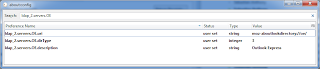
Now for the best part for those using Samsung phones. The Samsung Suite places your contacts into the windows contact folder and synchronizes them from there. So with this preference edit contact synchronised from your phone will also synchronize to Thunderbird.
One Caveat. Contacts in this address book will not have a "show remote images" flag, so remote images for them will not show.
So to share this with the world, and get your windows contacts into Thunderbird please warm up your mouse and open the Thunderbird Config Editor.and add the following preferences.
Right clicking on the heading Preference Name will present a menu, select new and then either String or Integer as required in the instruction.
- First Add a string with the name "ldap_2.servers.OE.description" , when you click Ok set the value in the dialog that opens to "Outlook Express"
- Next add a new integer ldap_2.servers.OE.dirType , and when you click Ok for adding it set it to 3.
- Finally Add another string this time names "ldap_2.servers.OE.uri" , and when you click Ok set it to "moz-aboutlookdirectory://oe/"

Now for the best part for those using Samsung phones. The Samsung Suite places your contacts into the windows contact folder and synchronizes them from there. So with this preference edit contact synchronised from your phone will also synchronize to Thunderbird.
One Caveat. Contacts in this address book will not have a "show remote images" flag, so remote images for them will not show.
Saturday, September 7, 2013
Expand your filter use
Filters are one of those things, we all expect the mail client has them, and mostly they are used for really mundane tasks like a block list. But filters have many many uses and if you understand the process, you can probably think of a new use often.
But before talking about filters, there is the issue of when and where they will work. The default out of the box arrangement for Thunderbird is they work on the inbox of a single mail account. As discussed below, that can be expanded for IMAP accounts and with the use of the Send Filter add-on you can run filters on mail as you send it.
If you have an IMAP mail account the filter will only run on the inbox. The functionality to enable filters to run on all sub folders has been around since Thunderbird version 3, but they never got around to placing a setting in the user interface to set it up, so you need to do it manually.
In Thunderbird select options from the tools menu. Then select the Advanced tab and finally on the General sub tab select the config editor button. Promise to be careful
In the list of settings, right click and select New and then string from the fly out menu

in the enter preference name dialog, place the following text and click Ok
Note: These settings are case sensitive, so be sure to copy them exactly, including the camel case.
Now all your filters on IMAP mail accounts will run against all folders. This is a good thing if you want to say auto archive mail based on age. It is a bad thing if you want to move mail from the inbox to somewhere else.. Enter the filtaQuila add-on. This add-on, among it's list of features makes it possible to include the folder name in Filters, so a filter that used to move mail from snoopy@charliebrown.org to the folder snoopy now needs a folder name in the mix, either as if folder is not "name" so the filter will run on all folders but the destination, or folder is "name" so the filter only works on that folder.
But before talking about filters, there is the issue of when and where they will work. The default out of the box arrangement for Thunderbird is they work on the inbox of a single mail account. As discussed below, that can be expanded for IMAP accounts and with the use of the Send Filter add-on you can run filters on mail as you send it.
If you have an IMAP mail account the filter will only run on the inbox. The functionality to enable filters to run on all sub folders has been around since Thunderbird version 3, but they never got around to placing a setting in the user interface to set it up, so you need to do it manually.
In Thunderbird select options from the tools menu. Then select the Advanced tab and finally on the General sub tab select the config editor button. Promise to be careful
In the list of settings, right click and select New and then string from the fly out menu

in the enter preference name dialog, place the following text and click Ok
mail.server.default.applyIncomingFiltersThe next dialog asks for a value for mail.server.default.applyIncomingFilters. Enter the value
Trueand click Ok
Note: These settings are case sensitive, so be sure to copy them exactly, including the camel case.
Now all your filters on IMAP mail accounts will run against all folders. This is a good thing if you want to say auto archive mail based on age. It is a bad thing if you want to move mail from the inbox to somewhere else.. Enter the filtaQuila add-on. This add-on, among it's list of features makes it possible to include the folder name in Filters, so a filter that used to move mail from snoopy@charliebrown.org to the folder snoopy now needs a folder name in the mix, either as if folder is not "name" so the filter will run on all folders but the destination, or folder is "name" so the filter only works on that folder.
Monday, July 15, 2013
Date and Time in mail lists.
The dates and times used by Email are UTC. This means that for Thunderbird to set up the correct date and time on emails your operating system must be set to the correct timezone and daylight saving settings.
Simply because the little clock on the bottom right of your screen shows the correct time does not mean your time zone is correctly set.
Instructions for changing the timezone are;
XP Vista Windows 7 and Windows 8 OSX
Thunderbird has only ever displayed the time on messages for today. The logic involved is fairly simple. It makes todays messages easier to identify in the list, and you don't need to be shown todays date as you already know it.
If for some reason your feel you must have a date MozillaZine have detailed instructions on overriding date and time formats in Thunderbird.
Simply because the little clock on the bottom right of your screen shows the correct time does not mean your time zone is correctly set.
Instructions for changing the timezone are;
XP Vista Windows 7 and Windows 8 OSX
Thunderbird has only ever displayed the time on messages for today. The logic involved is fairly simple. It makes todays messages easier to identify in the list, and you don't need to be shown todays date as you already know it.
If for some reason your feel you must have a date MozillaZine have detailed instructions on overriding date and time formats in Thunderbird.
Tuesday, April 16, 2013
Images do not display.
Sometime the remote images in an email do not display This could be due to the permissions.default.image hidden preference in Thunderbird. If you never see the allow images button on emails from senders not in your address book this setting is the probable cause of the images and the button not appearing.
As I understand this preference, it blocks remote images. 2 blocks everything 1 allows images from the original server, 0 allows images from any server. With 1 being the Thunderbird default.
Go to Tools menu > options > advanced > config editor
Type into the search box permissions.default.image or as much as you need to double click on it in the list below.
When changing this setting, it is advisable to reduce the setting to it's current value -1 as each reduction in values is a reduction in security as well as an increase in convenience.
As I understand this preference, it blocks remote images. 2 blocks everything 1 allows images from the original server, 0 allows images from any server. With 1 being the Thunderbird default.
Go to Tools menu > options > advanced > config editor
Type into the search box permissions.default.image or as much as you need to double click on it in the list below.
When changing this setting, it is advisable to reduce the setting to it's current value -1 as each reduction in values is a reduction in security as well as an increase in convenience.
Sunday, April 7, 2013
The RETR command did not succeed. Thank ATT and YAHOO for the need for this post
This post is about the "conversation" that occurs between a mail client and the mail server when the client is downloading mail using POP3
Because email is one of the early developments of the internet, everything about the connection and download of mails is done in plain text in the English language. So much so that you can log into a mail server and get you mail by typing text commands in response to text prompts from the server
But we are not going there. If that is your interest there is an article here that discusses how to use Telnet to connect to the POP3 server.
I am concentrating on only Three of those POP commands STAT, LIST and RETR.
STAT is the command issued to the server to ask if there is mail to download. The server replies with a message that looks like
LIST is the command that follows and is designed to get the server to provide more information about the messages it is holding. So when your mail client issues the list command to the server it get a reply that looks something like this.
This allows for the Third command, RETR. Using the information obtained in the proceeding LIST the mail client can now proceed to ask the mail server for the message. This is done using the RETR command and the message number. This command is issued once for each message to initiate a download of that message and looks something like this.
As you can see, for the RETR command to fail, there basically has to be a problem on the server as the mail client (Thunderbird) is only asking the server to provide that which it has already said is available.
Further information can be found in RFC 1939 which is the standard that all POP3 compliant mail server and clients must comply with
Because email is one of the early developments of the internet, everything about the connection and download of mails is done in plain text in the English language. So much so that you can log into a mail server and get you mail by typing text commands in response to text prompts from the server
But we are not going there. If that is your interest there is an article here that discusses how to use Telnet to connect to the POP3 server.
I am concentrating on only Three of those POP commands STAT, LIST and RETR.
STAT is the command issued to the server to ask if there is mail to download. The server replies with a message that looks like
+OK nn mm
where nn is number of messages and
mm is the total size of those messages.
LIST is the command that follows and is designed to get the server to provide more information about the messages it is holding. So when your mail client issues the list command to the server it get a reply that looks something like this.
Thunderbird: LIST
Server: +OK 2 messages (320 octets)
Server: 1 120
Server: 2 200
Server: .
In this example there are 2 messages available
This allows for the Third command, RETR. Using the information obtained in the proceeding LIST the mail client can now proceed to ask the mail server for the message. This is done using the RETR command and the message number. This command is issued once for each message to initiate a download of that message and looks something like this.
             Thunderbird: RETR 1
             Server: +OK 120 octets
             Server: <the POP3 server sends the entire message here>
             Server: .
As you can see, for the RETR command to fail, there basically has to be a problem on the server as the mail client (Thunderbird) is only asking the server to provide that which it has already said is available.
Further information can be found in RFC 1939 which is the standard that all POP3 compliant mail server and clients must comply with
Subscribe to:
Posts (Atom)
-
This document predates the official Thunderbird support documentation at https://support.mozilla.org/en-US/kb/compacting-folders What is ...
-
With the introduction of the rewritten mail send there has been a huge uptick in the number of folk having issues sending mail from Thunde...
-
 There has been something of a rash of people loosing either the toolbar or the menu bar in Thunderbird. This is probably only going to get ...