Thursday, June 9, 2016

Hotmail Proxy errors

The longer I deal with Microsoft the less surprised I become by there aggressive and underhanded marketing.  The latest from Microsoft is that they are converting all of their existing Hotmail/ Live/MSN accounts to their new outlook.com. What these good people forgot to mention is, if you have been getting your mail via the pop protocol until now,  they are going to turn that option off for you.

How did I become aware they had done this for me.  Thunderbird no longer received mails from my Hotmail accounts.  Instead I got this lengthy and opaque  error message.

Sending of password for user {MyEmailAddress]@hotmail.com did not succeed. Mail server pop3.live.com responded: Authentication failure: unknown user name or bad password. [Error="ProxyNotAuthenticated" AuthResult=0 Proxy=SIXPR0201MB0940.apcprd02.prod.outlook.com:1995:SSL]


So now I am aware of this blatant decision to ignore the users settings in favour of some that favour vendor lock-in. I think it is high time for some user instructions on how to set things back to rights.

First log into your account at Hotmail/Live/MSN/Outlook using your browser.   Once you get there you will probably be facing a user interface that is entirely new to you.

To start locate the cog on the right of the toolbar pane. It displays the following menu, and is included in the image


Select options from the menu entry and you will be taken to the following page, where you will need to click on the POP and IMAP settings entry on the left.


Change the POP options to on. and click the save "button"
Click on another folder and then click back on the POP and IMAP settings entry.


You will now see that the settings for the account, including the server name are shown   Make note of that server name.  Currently simply turning the option back on will restart downloads to your mail client,  be it Thunderbird or any other POP client.  However for future proofing, I strongly suggest you change the server name you are using to the one provided by the web site. There is no telling when they will simply remove the old server names.

Right click your account in the folder pane of Thunderbird, and select settings.
In the server setting page for the account insert the server named in your settings on the web page.

In my case I was advised the server name was pop-mail.outlook.com so that is what is shown in the image above.   When I changed the server name Thunderbird warned me about filters.  This is not an issue, as all that is changed is the server name.  Everything else remains the same, really it is the same account on the same server, so just acknowledge the warning. Your user name will not change from what you are using currently, which should be your full email address.




Saturday, January 23, 2016

Outlook.com / Office365 Imap subscribed folders disappear, difficulty in subscribing

Over the past couple of days it has become apparent that there has been an issue with IMAP accounts hosted on office365 and outlook.com.  Support has received a number of complains of subscribed folders disappearing from Thunderbird and attempts to re-subscribe failing.

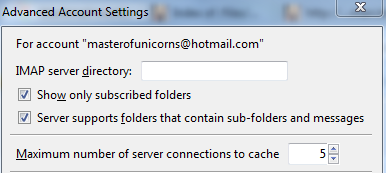
A workaround has been identified by turning off the Thunderbird option "Show only subscribed folders".

To turn off this option;
  1. Right click the account in the folder pane.
  2. Select the menu entry Settings
  3. In the server settings for the account,select the advanced button.
  4. In the advanced account settings dialog, un-check the option "Show only subscribed folders"


----o0O0o----


Microsoft have now acknowledged the issue as EX41924 and are posting updates here. At the time of writing this post the latest update (update 4) is suggesting a code solution has been developed and is currently being deployed across the office365 and outlook.com web sites to remediate the failure their previous patch caused.Affected users that wish to follow the Microsoft support thread on community.office365.com can find it here.

While it is unfortunate,  there is nothing the Thunderbird community can do in this other than offer the workaround until such time as Microsoft resume normal services.


Sunday, March 22, 2015

Filter Import/Export

For a short time until Thunderbird V5 was released there was a message filter import export add-on.

This appears to have been abandoned by it's original Author, and around the time of Thunderbird Version 19 someone fiddled the max version and again added it to Thunderbird addons at AMO. I have done the same to increase the max version to 38.  So the add-on should install for a while yet.  I have not used it as yet.but I appear to lack an import option.Looks like I will have to investigate further.

Download

Sunday, October 12, 2014

Sync Hotmail/Outlook.com contacts with the Thunderbird address book.

For as long as I have been using Thunderbird there have been those folk who wanted to synchronise contacts with Hotmail/Outlook.com.  This has been relatively simple for Google account holders, with multiple add-ons available, with relative strengths and weaknesses.  Whilst chasing information on an unrelated subject in the past week I stumbled upon the TZ Push add-on. Something of an unfortunate name as it does not allude to it's ability with activesync or Outlook.com.  This add-on connects to ActiveSync data sources. The add-ons page states Z-Push, Zentyal/Zarafa, Horde, Outlook.com and other Activesync providers.  So there are two things here.

  1. TZ Sync is an activeSync address book synchronisation tool. So any service that offers activSync or Exchange ActivSync should be supported.
  2. There is a truly viable way to syncronise contact information between Thunderbird and Outlook.com.

Lightning and CalDav

While the title of this [post is CALDav and Lightning,  most of the space is going to be taken up with Googles implementation as it is problematical and Google are all over the place with their documentation.  It has taken hours of trawling through Google help and support articles as well as support forums to finally put together all of the necessary bits for Google.  Yahoo on the other hand mange is in about 10 lines on one page.

Traditionally Mozilla have recommended the use of the gdata provider with Goggle calendars to create read write access to those calendars using XML. This process pre-dates Googles adoption of CalDavand requires the Gdata provider add-on as well as Lightning.   CalDav read write synchronisation requires no third party data provider and just works and works the same for other CalDav.

To create a CalDav connection to your Goggle calendars, first you need to establish your personal CalDav URL for connection to the calendar.  If you have a single calendar the calid is your email address.

  • In this example if your email address is something@gmail.com then the URL is
    https://apidata.googleusercontent.com/caldav/v2/something@gmail.com/events
  • Additional calendars have a calid issued by Google so using the base URL replace the calid with the correct Id for your calendar.


Enable CalDav synchronization.

Even though it is not referenced anywhere else the page says Select calendars to sync to your iPhone/iPad/iCal* following the asterisk shows or any other CalDAV device.So in typical style the option in there, but well disguised.so navigate to https://www.google.com/calendar/syncselect and enable CalDav.


Note:- I had trouble with my CalDav Calendars on Google and found that I needed to use the config editor to change the preference network.http.spdy.enabled.http2draft to False  

Note that there are other network.http.spdy.enabled. preferences but only the http2draft appears to affect he outcome.  Bug 1081613 refers

Wednesday, April 9, 2014

Backup up Gmail with Thunderbird.

I see people in the support forums all the time asking about backing up their gmail mail with Thunderbird and I really do not understand why they are doing so.

Google offer a direct backup of your Gmail mail, as well as all of your Google data, but it is mail that appears to be the thing people want to back up. Google create a backup MBOX mail format file with your mail which they then compress so it is smaller and offer it to you to download. The MBOX format is used by Evolution, Thunderbird, Mac Mail and lots of other mail clients and is a de facto standard for mail storage and exchange.

This archive file can be unzipped and imported into a mail client at any time, now or in the future.

In the case of Thunderbird, the Import/Export tools will import the MBOX file into Thunderbird for you, without fuss.

Sure there are other ways to backup your gmail,  but this is probably the least difficult and most sure of any and uses significantly less bandwidth than any other method to boot.


Friday, February 7, 2014

Basic troubleshooting for Thunderbird.

Like all communications, email to is prone to drop outs and minor and sometimes major faults.  So when you mail is not working,  what do you do.

The following is a list of checks you need to make.


  • If your mail is not downloading, check on your mail providers web site that they are not having some sort of outage, or server down issue.  After all, whilst things have become quite reliable in recent years, there are no guarantees.
  • Next restart Thunderbird with add-ons disabled. (Thunderbird safe mode)  Thus us on the help menu (Ctrl + H). If Thunderbird works like normal, there is an Add-on or theme interfering with normal operations, you will need to re enable add-ons one at a time until you locate the offender.
  • Restart Windows in Safe mode with Networking. Windows 8 Windows 7 Windows Vista Windows XP OSX  If this fixes your ussue, it will be resident software loaded into your computer other than Thunderbird that is the cause.  Common problem applications that are not loaded in "safe mode" are anti virus tools, malware detection programs, memory and disk optimisers, privacy protectors and legitimate spy-ware installed by employers to monitor staff.  No naming of names here,  usually in a home environment it will be anti virus programs, but all security and net nanny type software is suspect.


Finally if you have the urge to say suddenly my mail stopped downloading / working.  It is more than likely not an issue with your mail client.  Sometimes it is the mail provider changing connection settings so these need to be confirmed. Other times it is following an update to Thunderbird, then it is more than likely the firewall component in your internet security suite / anti virus.